
The information below is now outdated, as TextWrangler is no longer available, but I’m keeping it here for historical reasons.
Now you should just download BBEdit. Yes, it’s a paid app, but if you don’t buy it, after 30 days the extra features don’t work any longer & you basically get what used to be TextWrangler.
TextWrangler is a free text editor for Mac OS X, the free little brother to the much more expensive (and, it must be said, much more feature-filled) BBEdit. It's a great text editor in its own right, however, and in particular it's good to install if your needs aren't great or if you want to test it out before graduating to BBEdit.
Go to http://www.barebones.com/products/TextWrangler/download.html and click on the Download link under the TextWrangler section.
After you finish downloading the TextWrangler installer, double-click on the TextWrangler dmg & follow these steps to install the software:
-
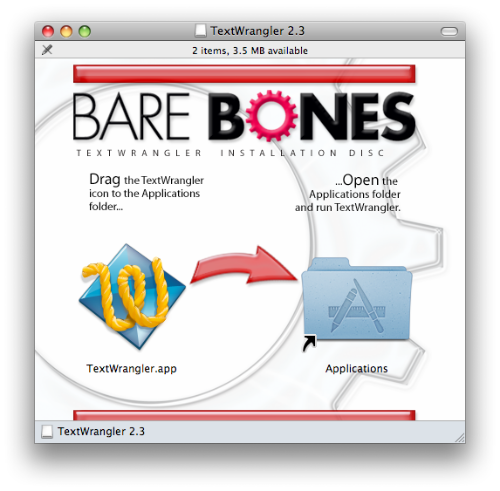
A Finder window will open up titled TextWrangler 2.3, as shown the figure.
-
Drag TextWrangler.app to theApplications folder in this window.
-
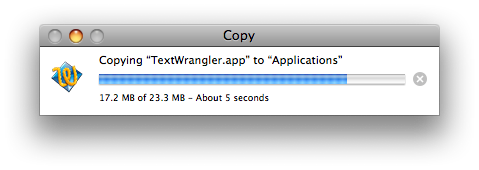
TextWrangler will install and you will see a progress bar, as shown in the figure.
-
Click on the Bare Bones logo in the TextWrangler window.
-
Go to > to eject the dmg file.
-
You may now delete the TextWrangler dmg by dragging it to the Trash.
You've finished installing TextWrangler!