
On this page…
One of the first things you need to know about making web pages is the importance & usage of the DTD (Document Type Definition).
Purpose
DTD's are vitally important to your webpages:
- Required at the beginning of every HTML document
- Tells web browsers & validators which version of HTML to use
- Extremely important today as browsers need to adhere to standards
Types
There are many different DTDs, as shown in the following table.
| Strict | Transitional | Frameset | |
|---|---|---|---|
| Meaning |
|
|
|
|
HTML 2
(1995) |
<!DOCTYPE HTML PUBLIC "-//IETF//DTD HTML//EN">
|
||
|
HTML 3.2
(1997) |
<!DOCTYPE HTML PUBLIC "-//W3C//DTD HTML 3.2 Final//EN">
|
||
|
HTML 4.01
(1999) |
<!DOCTYPE HTML PUBLIC "-//W3C//DTD HTML 4.01//EN" "http://www.w3.org/TR/html4/strict.dtd">
|
<!DOCTYPE HTML PUBLIC "-//W3C//DTD HTML 4.01 Transitional//EN" "http://www.w3.org/TR/html4/loose.dtd">
|
<!DOCTYPE HTML PUBLIC "-//W3C//DTD HTML 4.01 Frameset//EN" "http://www.w3.org/TR/html4/frameset.dtd">
|
|
XHTML 1.0
(2000) |
<!DOCTYPE HTML PUBLIC "-//W3C//DTD XHTML 1.0 Strict//EN" "http://www.w3.org/TR/xhtml1/DTD/xhtml1-strict.dtd">
|
<!DOCTYPE HTML PUBLIC "-//W3C//DTD XHTML 1.0 Transitional//EN" "http://www.w3.org/TR/xhtml1/DTD/xhtml1-transitional.dtd">
|
<!DOCTYPE HTML PUBLIC "-//W3C//DTD XHTML 1.0 Frameset//EN" "http://www.w3.org/TR/xhtml1/DTD/xhtml1-frameset.dtd">
|
|
XHTML 1.1
(2001) |
<!DOCTYPE HTML PUBLIC "-//W3C//DTD XHTML 1.1//EN" "http://www.w3.org/TR/xhtml11/DTD/xhtml11.dtd">
|
||
|
HTML5
(2014?) |
<!DOCTYPE html>
|
Quirks Mode
If you
- don't use a DTD,
- or you leave off the URL when using HTML 4.01 or XHTML 1.0
then browsers go into Quirks Mode: the browsers emulate odd behaviors dating back 10 or more years. You do not want your webpages to be rendered in Quirks Mode!
Internet Explorer & Quirks Mode
It wouldn't be web development if you didn't have to make special considerations for Microsoft's IE.
Modes & META elements
IE 6-7 on Windows has two modes:
- Quirks Mode: IE renders like legacy versions of IE (pre-6) & doesn't adhere to current Web standards.
- Standards Mode: IE tries to render pages in accordance with current standards (not that it does a great job, since it's adherence to standards is awful).
IE 6 & earlier has a bad bug: if there's anything in your document before the DTD, IE switches to Quirks Mode. As you'll learn later, sometimes (with XHTML) you're supposed to start the document with an XML declaration: <?xml version="1.0" encoding="UTF-8"?>. Doing this switches IE 6 & below into Quirks Mode. What a mess.
IE 8 on Windows is far more complicated. There are many different compatibility modes, which you indicate with a META element inside your HEAD element:
- IE 5 Mode: IE 8 tries to emulate IE7 quirks mode, which is similar to IE 5.
<meta http-equiv="X-UA-Compatible" content="IE=5" /> - IE 7 Mode: IE 8 tries to emulate IE 7 standards mode, whether or not the page has a DTD (this is not good).
<meta http-equiv="X-UA-Compatible" content="IE=7" /> - EmulateIE 7 Mode: IE 8 uses the DTD to decide whether to use IE 5 Mode or IE 7 Mode. Used by IE 8 by default for pages loaded from an Intranet or with embedded IE.
<meta http-equiv="X-UA-Compatible" content="IE=EmulateIE7" /> - IE 8 Mode: IE 8 renders pages in IE 8 standards mode.
<meta http-equiv="X-UA-Compatible" content="IE=8" /> - EmulateIE8 Mode: IE 8 uses the DTD to decide whether to use IE5 Quirks Mode or IE 8 Standards Mode. Used by IE 8 by default for pages loaded from the Internet.
<meta http-equiv="X-UA-Compatible" content="IE=EmulateIE8" /> - IE Edge Mode: IE renders pages in the current browser's standards mode: IE 8, IE 9, IE 10, etc. Microsoft recommends using this only with test pages, since who knows what the future will bring, but to heck with 'em. Use this one in your webpages, after you're done testing how your webpage looks in IE 7 Compatibility Mode using the Compatibility View Button pictured below.
<meta http-equiv="X-UA-Compatible" content="IE=edge" />
The META element must appear before all other elements in the HEAD, except for the TITLE element & other META elements.
Compatibility View Button
A user can also click the Compatibility View Button on the IE 8 toolbar to emulate IE 7, shown in the figure below:
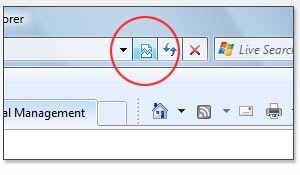
This button only appears if IE 8 determines that the page might not render properly in IE 8 Mode.
This button will not appear if you're using IE Edge Mode.
Compatibility View List
Microsoft publishes a Compatibility View List that tells IE 8 to automatically render certain sites on the list like IE 7. This list is updated through Windows Update, but only if the user first manually chooses to install it (which is completely crazy).
Of course, IE is the only browser that adheres to all of this mishegoss.
What You Should Use
For the first few meetings of our class, we're goin' old school, so you should use HTML 4.01 Transitional DTD:
<!DOCTYPE HTML PUBLIC "-//W3C//DTD HTML 4.01 Transitional//EN" "http://www.w3.org/TR/html4/loose.dtd">
Then we’re going to move forward just a bit, so you can use the HTML 4.01 Strict DTD:
<!DOCTYPE HTML PUBLIC "-//W3C//DTD HTML 4.01//EN" "http://www.w3.org/TR/html4/strict.dtd">
However, we'll finally enter the modern era, & then you should use this DTD in class & going forward:
<!DOCTYPE html>
Why use this DTD? Or, to put it another way, why did the writers of the HTML5 spec choose this particular DTD (& another for legacy systems that looks like this: <!DOCTYPE html SYSTEM "about:legacy-compat">)? Here's their answer:
[T]hey meet the following criteria:
- They trigger standards mode in all current and all relevant legacy browsers [in other words, older browsers won't choke on it].
- They are well-formed in XML and can appear in XHTML documents.
- It is possible to output at least one of the alternatives, if not both, with extant markup generators.
- They intentionally contain no language version identifier so the DOCTYPE will remain usable for all future revisions of HTML.
- The first is short and memorable to encourage its use.
- The legacy-compat DOCTYPE is intentionally unattractive and self descriptive of purpose to discourage unnecessary use.
You can see a nice table showing the various browsers' support for the HTML5 DTD at Activating Browser Modes with Doctype.
The W3C has this additional point to make about the HTML5 DTD (note: I added the link):
As HTML5 is no longer formally based upon SGML, the DOCTYPE no longer serves this purpose, and thus no longer needs to refer to a DTD. However, due to legacy constraints, it has gained another very important purpose: triggering no-quirks mode in browsers.
HTML 5 defines three modes: quirks mode, limited quirks mode and no quirks mode, of which only the latter is considered conforming to use. The reason for this is due to backwards compatibility. The important thing to understand is that there are some differences in the way documents are visually rendered in each of the modes; and to ensure the most standards compliant rendering, it is important to ensure no-quirks mode is used.
Further Information
Gutfeldt, Matthias. "Doctype switching and standards compliance: An overview". Matthias Gutfeldt (2003). http://gutfeldt.ch/matthias/articles/doctypeswitch.html.
Hunt, Lachlan. "HTML 5 Reference: A Web Developer’s Guide to HTML 5". W3C (2009). http://dev.w3.org/html5/html-author.
Microsoft. "META Tags and Locking in Future Compatibility". MSDN (2010). http://msdn.microsoft.com/en-us/library/cc817574.aspx.
Microsoft. "Windows Internet Explorer 8 Compatibility View List". Microsoft Download Center (2010). http://www.microsoft.com/downloads/details.aspx?FamilyID=b885e621-91b7-432d-8175-a745b87d2588&displaylang=en.
Quinn, Liam. "Choosing a DOCTYPE". Web Design Group (2005). http://www.htmlhelp.com/tools/validator/doctype.html.
Sivonen, Henri. "Activating Browser Modes with Doctype". Henri Sivonen’s pages (2010). http://hsivonen.iki.fi/doctype.
Upsdell, Chuck. "Resources > DOCTYPEs". Browser News (2010). http://www.upsdell.com/BrowserNews/res_doctype.htm.
WHATWG Wiki Contributors. "FAQ". WHATWG Wiki (2012). http://wiki.whatwg.org/wiki/FAQ.
Wikipedia. "Document Type Definition". Wikipedia (2010). http://en.wikipedia.org/wiki/Document_Type_Definition.
Wikipedia. "Standard Generalized Markup Language". Wikipedia (2012). http://en.wikipedia.org/wiki/Standard_Generalized_Markup_Language.
Zeldman, Jeffrey. "Fix Your Site With the Right DOCTYPE!". A List Apart (2002). http://www.alistapart.com/articles/doctype/.